
Show, hide, update or add Political Views on your Facebook profile
Because of the amount of details you (optionally) provide about yourself on your public profile, and the ever-increasing number of Facebook users (half-a-billion, as of summer 2010), the Facebook social networking site is a wonderful and easy way to meet like-minded people from anywhere.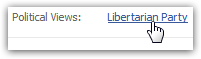 Since politics will sooner or later come up as a subject, you might as well avoid disappointments and advertise your political views right away! Political views are a standard field in your Facebook account, and is tied to a huge database of political parties from around the world: encouraging a standard denomination for your political views guarantees that people will find you through the clickable party name in public profiles (see screenshot), and find pages and people on Facebook who belong to a particular political affiliation.
Add or update your political views on Facebook
Follow these steps to add or edit your profile page's political stance:
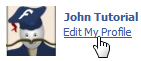 If needed, sign in to your Facebook account, and then click on "Home".
- Once you are signed in, click on the "Edit My Profile" link (screenshot)
- Facebook will load your profile settings, including information about your politics.
- Scroll down until you see the "Political Views" text field, and place your cursor in it.
- Type any letter (like the first letter of your party affiliation's official name), and Facebook will lookup all political parties in its database matching what you have typed so far:
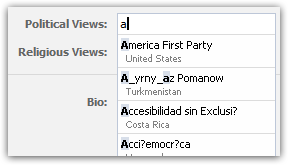
- Notice from the image above that Facebook includes political parties and movements from around the globe - try variations of your party's name if you don't find it right away.
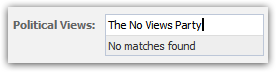 If Facebook displays a "No matches found" message after you typed a certain political party name, start by checking your spelling (capitalization - uppercase/lowercase - does not matter). If there were no mistake, Facebook will let you save this party as your political view nonetheless.
 Once you have finished typing a political affiliation for your profile, scroll all the way down and click on the "Save Changes" button apply this new setting to your Facebook page.
Tip: please see our next free Facebook tutorial to learn how to edit your Religious Views.
Facebook Tutorial 
- Customize and Edit Facebook Profile Tutorials:
- Edit / change your Facebook profile information
- Change Facebook email address
- Change Facebook password
- Show, hide, or add your gender on your Facebook profile
- Add or remove "interested in men / women" on your Facebook profile
- Update the "Looking For" settings on your Facebook profile
- Add, remove, or change your Current City in your Facebook profile
- Add or remove Hometown on your Facebook profile
- Add your birthday on Facebook + Customize birth date display settings
- Show, hide, update or add Political Views on your Facebook profile
- Remove, update, add Religious Views on Facebook profile (your religion)
- Add a mini bio on your Facebook profile (biographical information about you)
- Add a quote on your Facebook profile + Edit Favorite Quotations
- Add, remove, or update Employer / job information on your Facebook profile
- Add another Employer to your Facebook profile (second job)
- Remove or add your High School name on your Facebook profile
- Remove or add College or University name + degree on Facebook profile
- Add a second college or university on your Facebook profile (another school)
- Hide updates on your Facebook account profile (Delete Recent Activity)
- Change Facebook language settings
- Add languages you speak to your Facebook profile
These free Facebook tutorials were written for the new Facebook, and are updated with each latest version of your favorite social networking site on Windows and Mac.